
Also applies to: dashboard not loading data, partial results, no scores showing, survey results not appearing, some units missing from dashboard, confidentiality threshold, access permissions, unit head can't see results, not assigned to correct unit, survey still processing.
⚠️ Who is this article for? This guide is for survey administrators, dashboard viewers, and Unit Heads. If you cannot see your dashboard or survey project, contact your Entity Admin to confirm your access permissions. Not sure who your Entity Admin is? See How to Invite and Manage Entity Admin Users.
After a survey closes, your dashboard should display the collected results. If it appears empty or incomplete, this is almost always caused by one of five things: processing time, the confidentiality threshold, your access level, the survey not being fully closed, or a Unit Head not being assigned to the correct unit. Work through each section below in order.
💡 Where to start: The confidentiality threshold (Section 2) is the most common cause of missing data. Check that section first before assuming something has gone wrong.
1. The survey may still be processing
After a survey closes, EngageRocket processes all responses before making them available on your dashboard. This usually takes a few minutes, but large surveys may take longer.
Wait at least 15–30 minutes after the survey closes, then refresh your dashboard. If data still does not appear after 30 minutes, continue to Section 2 below.
2. The confidentiality threshold may not have been met
EngageRocket hides results for any group where the number of responses falls below the confidentiality threshold. This protects respondent confidentiality and is the most common reason dashboards appear empty or show only partial data.
The confidentiality threshold is set at the organisation level during your account setup — it is not a fixed number and may vary between organisations. It cannot be bypassed or overridden by individual users. If a unit or group does not reach the threshold, their results will not appear, even if results are visible for other units. Open-ended responses and demographic filter views are subject to the same threshold.
If you believe your threshold is set incorrectly for your organisation's size, contact your Customer Success Manager to review it.
See What is the confidentiality threshold and why can't I see results? for a full explanation of how it works.
💡 If you can see an overall score but not specific unit breakdowns, the confidentiality threshold is almost certainly the cause. Results are only hidden where the response count is too low — not across your entire dashboard.
3. Your dashboard access level may be limiting what you see
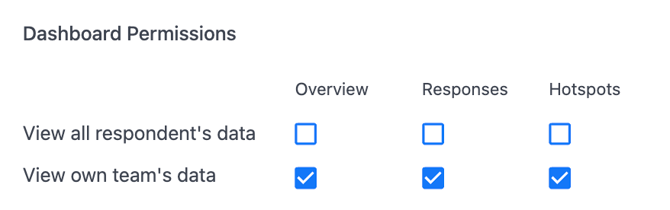
What you see on your dashboard depends on the permissions assigned to your account. There are two levels: View all respondents' data (org-wide access) and View own team's data (restricted to your assigned unit). If your access is set to the latter, you will only see results for your own unit.
To check what access level you currently have, see How to Check What Permissions You Have in EngageRocket. If you believe your access needs to be updated, ask your Entity Admin to review your dashboard permissions. See How to Configure Survey and Dashboard Permissions for the steps they need to follow.
4. The survey may not have been fully closed
A survey that appears closed may not have been formally closed in the platform. Until it is marked as Closed, results are not finalised and will not appear on your dashboard.
Go to Survey Projects and check the status of your survey. It should show as Closed. If it still shows as Active or Scheduled, the survey has not been closed yet — contact your Entity Admin to close it. Not sure who your Entity Admin is? See How to Invite and Manage Entity Admin Users.
5. You may not be assigned to the correct unit (Unit Heads)
If you are a Unit Head viewing your team's results and your dashboard is empty, you may not have been assigned to the correct unit in the Organisational Chart — or you may not have been assigned to any unit at all. In EngageRocket, Unit Heads can only see results for the specific unit they are assigned to. If that assignment is missing or incorrect, the dashboard will appear empty even when results exist.
This is something only your Entity Admin can fix. Ask them to check your unit assignment in the Organisational Chart and reassign you to the correct unit if needed. See How to Invite and Manage Unit Heads for the steps your Entity Admin should follow.
💡 If you were recently moved to a new team or your organisation's structure changed, your unit assignment in EngageRocket may not have been updated to reflect this. Always check this first if you are a Unit Head and your dashboard is blank.
Something Not Working?
I can see results for some units but not others — why?
- Likely cause: The units with no visible results did not meet the confidentiality threshold.
- Action: Review Section 2 above. The threshold cannot be overridden. See What is the confidentiality threshold and why can't I see results? for more detail.
I am a Unit Head and my dashboard is completely empty — what should I do?
- Likely cause: You may not be assigned to any unit, or you may be assigned to the wrong unit in the Organisational Chart.
- Action: Contact your Entity Admin and ask them to check and correct your unit assignment. See How to Invite and Manage Unit Heads for what they need to do.
My survey shows as Closed but there is still no data after 1 hour — what should I do?
- Likely cause: A data processing delay or error on the platform side.
- Action: This requires human support. Contact us at support@engagerocket.co and include your survey project name and the date the survey closed.
I have full admin access but still cannot see any results — what is wrong?
- Likely cause: A data processing issue on the platform side, or your dashboard permissions may not have been configured correctly.
- Action: First, verify your access level via How to Check What Permissions You Have in EngageRocket. If permissions are correct and data is still missing, contact support immediately with your survey project details.
Results are hidden for a unit I know had many respondents.
- Likely cause: A demographic filter may be narrowing the data below the threshold, even if the overall response count was high.
- Action: Reset all filters to the default view to see the full results. If data is still hidden after resetting filters, contact support.
⚠️ Important: Permissions and unit assignments in EngageRocket must be updated directly in the platform by an Entity Admin. Do not attempt to work around missing access by asking a colleague to share screenshots of their dashboard. To fix the root cause, ask your Entity Admin to update your permissions or unit assignment. See How to Configure Survey and Dashboard Permissions and How to Invite and Manage Unit Heads.
Still Need Help?
If you have questions about your dashboard data or survey results, reach out to us at support@engagerocket.co and we'll be happy to assist!