
Also applies to: responses not showing, fewer responses than expected, missing answers, low response count, open-ended responses not appearing, participation rate lower than expected, responses disappeared after survey closed.
⚠️ Who is this article for? This guide is for Entity Admins and survey administrators reviewing response data after a survey closes. If your entire dashboard is empty rather than just showing lower-than-expected responses, see Why is my dashboard empty or missing results after my survey closed? instead.
After a survey closes, it can sometimes look like responses are missing — either fewer than expected overall, or none at all for certain questions, units, or segments. In most cases, there is a straightforward explanation. Work through the sections below in order before contacting support.
💡 Where to start: Give the platform at least 15–30 minutes after the survey closes to finish processing before drawing any conclusions. Many cases of "missing" responses resolve on their own after a short wait.
1. The survey may still be processing
After a survey closes, EngageRocket processes all responses before making them available on your dashboard. This typically takes a few minutes but may take longer for larger surveys.
Wait at least 15–30 minutes after the survey closes, then refresh your dashboard. If the response count is still lower than expected after that time, continue through the steps below.
2. The confidentiality threshold may be hiding some results
If response counts look low for specific units, questions, or segments — but seem fine overall — the confidentiality threshold is likely the cause. EngageRocket hides results for any group that does not meet the minimum response threshold, to protect respondent confidentiality. This applies to scores, open-ended comments, and filtered views.
This is not a data loss issue, all responses are securely recorded, they are simply not displayed for groups that fall below the confidentiality threshold.
By default, the confidentiality threshold is set at 3 responses. However, this may be adjusted based on your organisation's settings. If you are unsure of the threshold configured for your organisation, check with your Entity Admin or reach out to your Customer Success Manager.
If a unit or segment has fewer respondents than the threshold requires, their results will be hidden to protect individual confidentiality. This is by design — it ensures no single respondent can be identified from the results.
See What is the confidentiality threshold and why are my results hidden? for a full explanation of how this works.
3. Some questions may have been optional
If the response count looks low for specific questions rather than across the whole survey, those questions may have been set as optional. Respondents are not required to answer optional questions, so it is normal for optional questions to have lower response counts than rating scale questions.
Review your survey questionnaire to confirm which questions were set as required and which were optional. If a question that should have been required was accidentally set as optional, this is a design issue to correct in future surveys. See How to Set Up Your Survey Questionnaire for guidance.
4. Not all recipients may have completed the survey
If the total response count is lower than the number of people you invited, it is likely that some recipients simply did not complete the survey before it closed. This is one of the most common reasons response counts fall short of expectations.
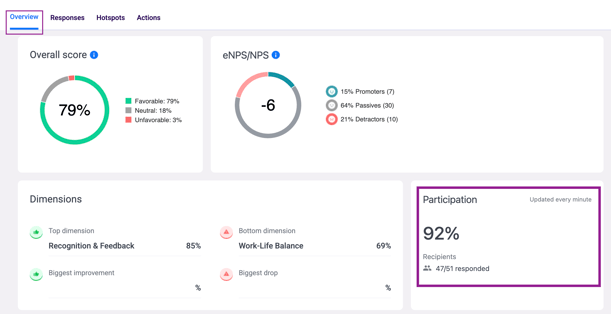
To check this, go to your survey dashboard and review the Participation section on the Overview tab — this shows the total number of responses submitted against the total number of recipients. See How to Navigate the Survey Dashboard Overview for help reading this section. If participation was lower than expected, consider whether reminder emails were sent during the survey window. See Respondents are not receiving survey emails if you suspect some recipients never received their invitation in the first place.
5. A dashboard filter may be narrowing your view
If you have applied demographic or unit filters on your dashboard, the data displayed will only reflect the filtered group — which can make response counts appear much lower than the actual total. This is one of the most commonly overlooked causes.
Go to your dashboard and reset all filters to the default view to see your full results. If the response count increases after resetting filters, the filter was the cause, not missing data.
Something Not Working?
Open-ended responses are showing for some units but not others — why?
- Likely cause: Units with fewer respondents than the confidentiality threshold will not display open-ended responses. This is by design to protect confidentiality.
- Action: No action can be taken to reveal hidden responses. See What is the confidentiality threshold and why are my results hidden? for more detail.
The response count is lower than the number of people I invited — what happened?
- Likely cause: Some recipients did not complete the survey before it closed.
- Action: Check the Participation section on your dashboard Overview tab to see the breakdown. For future surveys, consider scheduling reminder emails to improve completion rates. See Respondents are not receiving survey emails if you think some recipients never received the invitation.
Responses were visible before but have now disappeared — what should I do?
- Likely cause: This is unusual and may indicate a platform issue.
- Action: This requires immediate human support. Do not make any changes to the survey or dashboard. Contact us at support@engagerocket.co straight away with your survey project name and a screenshot of what you are seeing.
A specific respondent says they completed the survey but their response is not showing.
- Likely cause: The respondent may not have been included in the recipient list, or their response may have been submitted after the survey closed.
- Action: Go to the survey's Recipients tab and confirm the respondent is listed. If they are listed but their response is still missing after 30 minutes, contact support with the respondent's email address and survey project name.
⚠️ Important: If responses that were previously visible have disappeared, do not make any changes to the survey or your dashboard settings. Contact support@engagerocket.co immediately — this is an urgent issue that requires investigation.
Still Need Help?
If you have questions about missing or incomplete survey responses, reach out to us at support@engagerocket.co and we'll be happy to assist!