
Also applies to: confidentiality threshold, results not showing, unit results hidden, partial data on dashboard, scores not visible, demographic filter hiding results, survey not confidential warning.
⚠️ Who is this article for? This guide is for Entity Admins and Unit Heads who see missing or incomplete results on their dashboard. If you cannot see your dashboard at all, see Why is my dashboard empty or missing results after my survey closed? first.
The confidentiality threshold is a minimum number of responses required before results are shown for any group or unit on your dashboard. If a group does not reach that minimum, their data stays hidden. This is not a bug — it is a deliberate feature to protect the people who completed your survey.
💡 Where to start: If you can see overall scores but certain units or breakdowns are missing, the confidentiality threshold is almost certainly the reason. Read Section 2 to understand exactly how it applies.
1. Why confidentiality matters — and why we recommend keeping it on
When employees know their responses are confidential, they are far more likely to answer honestly. Honest responses lead to more accurate data, which in turn leads to better decisions for your organisation. When confidentiality is removed or weakened, employees often play it safe — giving neutral or positive responses rather than sharing how they really feel. This creates data that looks good on a dashboard but does not reflect reality.
Beyond response quality, confidentiality also protects your people. In small teams, individual responses can be identifiable even without a name attached — especially when combined with demographic filters like department, tenure, or location. A single person in a team could have their views traced back to them, which can damage trust, discourage future participation, and in some cases create workplace tension.
This is why EngageRocket strongly recommends keeping the confidentiality threshold enabled and set at a level that genuinely protects your respondents.
2. How the confidentiality threshold works
The threshold defines the minimum number of responses a group must have before their results appear on the dashboard. The confidentiality threshold is configured at the organisation level during account setup and may vary, the default starting point is 3 responses, but this may be adjusted based on your organisation's requirements. If you are unsure of your threshold, check with your Entity Admin or Customer Success Manager.
This threshold applies across the entire dashboard, not just the Overview tab. Open-ended text responses follow the same rule, if a unit does not meet the minimum, individual comments will not be shown either. Demographic filters are also affected: if you apply a filter that narrows a group below the threshold, results for that filtered view will be hidden even if the overall unit results are visible."
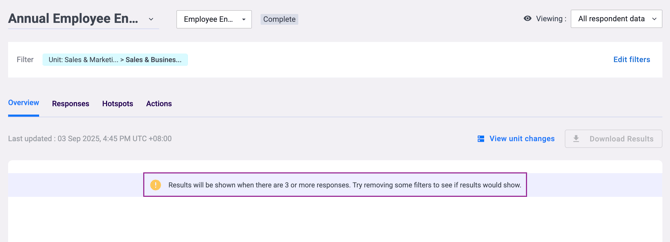
The Hotspots chart is particularly impacted by the confidentiality threshold because it displays data by both segments (demographics) and dimensions (categories of questions). This means the threshold applies at multiple levels:
- Segment visibility: Segments with fewer responses than the threshold won't appear in the Hotspots "Select segments to analyze" dropdown. You'll only see segments that have met the minimum response requirement.
- Dimension-level data: If a specific segment has insufficient responses for a particular dimension, that dimension's results won't display for that segment in the chart.
- Question-level data: When you expand a dimension to see individual questions, questions that don't have enough responses for a selected segment are also hidden.
- Multiple segment comparison: When comparing multiple segments side by side in Hotspots ("Analyze multiple segments" mode), each segment is independently evaluated. One segment might show all dimensions while another shows only a few, depending on their respective response counts.
Example: If analyzing by Department, and the Sales department has 2 responses while Marketing has 8 responses (threshold is 3), the Sales department won't appear in the segment dropdown at all. Only Marketing and other departments meeting the threshold will be selectable.
See Why is my dashboard empty or missing results after my survey closed? if your entire dashboard is empty rather than just certain units.
3. What happens if the threshold is lowered
The confidentiality threshold can be adjusted at the organisation level — but lowering it below EngageRocket's recommended minimum of 3 has an important consequence: the platform will display a notice to survey participants informing them that their responses may not be fully confidential.
This notice is shown automatically and cannot be suppressed. It is designed to ensure your employees always know the level of confidentiality that applies to their responses before they submit them. If participants see this notice and decide not to complete the survey, or provide less candid responses, the quality and completeness of your data may be affected.
For this reason, we strongly recommend keeping your threshold at 3 or above. If you need to adjust your threshold, contact your Customer Success Manager to discuss what level is appropriate for your organisation's size and structure.
⚠️ Important: The confidentiality threshold cannot be changed by individual users. It is set at the organisation level and can only be updated by your Customer Success Manager. Do not attempt to work around the threshold by filtering or segmenting data in ways designed to identify individual respondents.
4. What to do if results are hidden
If results are hidden on your dashboard because the threshold has not been met, there is generally no immediate action you can take — and that is intentional. However, there are a few things worth considering for future surveys.
If certain units consistently fall below the threshold, consider whether your organisational structure could be adjusted so that smaller units are grouped together, giving you a larger response pool. For targeted or pulse surveys, make sure you are distributing to a large enough audience to produce visible results. If your threshold feels too high or too low for your organisation's size, speak to your Customer Success Manager about reviewing it.
See How to Navigate the Survey Dashboard Overview for guidance on reading and filtering your dashboard results effectively.
Something Not Working?
Results are hidden for a unit I know had many respondents — why?
- Likely cause: A demographic filter may be narrowing the group below the threshold, even if the unit's total response count was sufficient.
- Action: Reset all filters to the default view. If results appear after resetting, a filter was the cause. Adjust your filter combination so no group drops below the threshold.
I need to see individual responses for compliance or HR reasons.
- Likely cause: You are trying to access data below the confidentiality threshold.
- Action: EngageRocket does not support revealing individual responses below the confidentiality threshold. This is a core platform feature and cannot be overridden. If you have a legitimate compliance requirement, contact your Customer Success Manager to discuss your options.
In Hotspots, I can't find a segment/department/demographic option to select.
- Likely cause: That segment has fewer respondents than your organization's confidentiality threshold (default: 3)
- Action: Check the Employee List to confirm response counts. If the segment should have enough responses, verify the survey distribution. You can only analyze segments that meet the threshold
In Hotspots, I see some dimensions for a selected segment but not all of them.
- Likely cause: Those missing dimensions don't have enough responses for the specific segment you selected. Each dimension is independently evaluated against the threshold for each segment
- Action: Try selecting "All respondents" or a larger demographic segment to view all dimensions
Participants are seeing a message saying the survey is not confidential — why?
- Likely cause: Your organisation's confidentiality threshold has been set below EngageRocket's recommended minimum of 3. When this happens, the platform automatically notifies participants.
- Action: Contact your Customer Success Manager to review and restore your threshold to the recommended level.
I want to lower the threshold so I can see results for smaller teams.
- Likely cause: Some units are not meeting the current threshold.
- Action: Before lowering the threshold, be aware that doing so will trigger a non-confidentiality notice to your survey participants, which may reduce response honesty and participation rates. Speak to your Customer Success Manager first to explore alternatives, such as restructuring small units or adjusting your survey distribution.
⚠️ Important: Reducing the confidentiality threshold is not a neutral setting change — it directly affects how your employees experience the survey and how honestly they respond. EngageRocket recommends a minimum threshold of 3 as best practice. Any changes should be made in consultation with your Customer Success Manager.
Still Need Help?
If you have questions about the confidentiality threshold or why certain results are hidden on your dashboard, reach out to us at support@engagerocket.co and we'll be happy to assist!