
Before uploading your Employee List, it's helpful to ensure your foundational setup is complete for a smooth survey launch and accurate reporting.
-
Organisational Structure (recommended to complete first)
If you haven't done so already, we recommend uploading your Organisational Structure. This defines how your teams and units are arranged, allowing your survey results to be segmented by department, level, or other key groups. Having this structure in place helps make your insights more meaningful and actionable. -
Employee List: This is your complete and accurate list of people who will be receiving the survey. It ensures responses are tracked correctly and that demographic filters like tenure or job function are available for analysis.
Together, these act as the backbone of your project. When set up correctly:
- Your reports will reflect the right team structures and hierarchies.
- Your data will be complete, relevant, and easy to analyse.
- Your insights will be more actionable and meaningful.
Now that your Organisational Structure is set (or once you’ve completed it), the next key step is uploading your Employee List. This pillar ensures your platform is ready to support a smooth, accurate, and successful survey experience from day one.
Your Employee List tells the system who’s in your organisation, so surveys reach the right people and your reporting reflects the correct context.
Step-by-Step:
-
Head back to the “Employees” tab, and click “Employee List”
-
Click Import (top right corner)
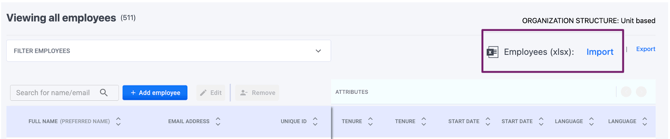
-
You can either, download a blank template and fill it in, or upload your completed list right away
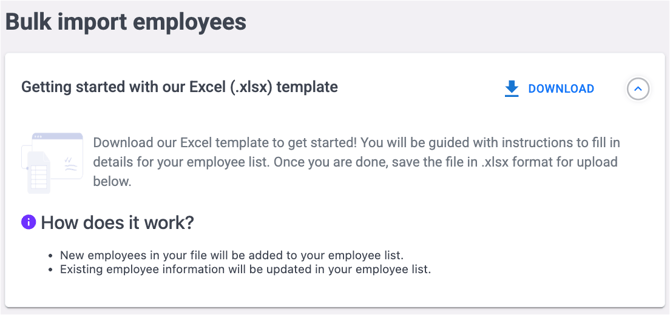
Before uploading your employee list, you can refer to the Instructions sheet in the downloaded template for guidance. To make it even easier, here are a few quick tips to help you fill it in smoothly:
-
Keep Columns A–G as they are (no changes or deletions)
-
Full name and email or employee ID are required
-
Use DD/MM/YYYY format for start dates (this powers automatic tenure calculations)
- Unit-based attributes, defined by the organizational structure, start from column H
- You can add extra fields attributes like Job Grade, Department, or anything you need in the subsequent column
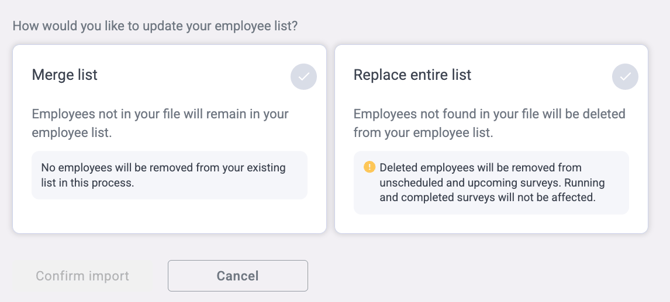
Choose Your Import Mode:
-
Merge List: To add or update employees without affecting current entries
-
Replace Entire List: This wipes the slate clean and replaces the whole list with the new file
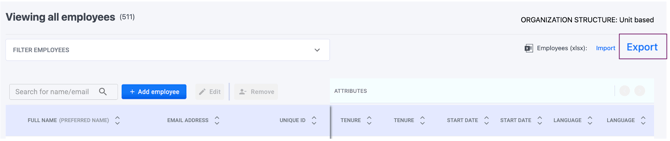
Need to update your employee list in the future? Simply click Export to download it, make your edits, and upload it back, no need to start from scratch!
Why These Pillars Matter?
Together, your org structure and employee list create a powerful base for everything that follows. Your structure shows where insights come from; your employee list brings those voices to life.
Think of it like preparing for a big event, your organisational chart is the seating plan, and your employee list is the guest list. Once both are ready, your event (aka survey) will run smoothly and reach exactly the right people.
If you have any questions or need further assistance, feel free to reach out to us at support@engagerocket.co We're here to help!