
What Are Action Plans?
Action Plans are your dedicated workspace for turning employee feedback into concrete commitments. Within ACT, they allow leaders and managers to document, manage, and track follow‑up actions based on survey insights.
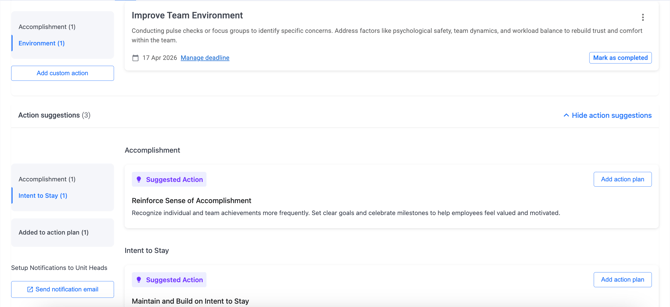
Think of Action Plans as a shared post‑survey to‑do list creating visibility, alignment, and accountability across teams.
How to Create Action Plans
1. Create from Action Suggestions
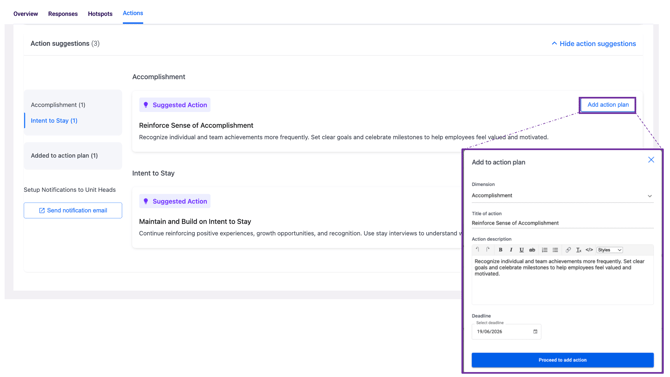
For a quick and guided start, Action Suggestions help you move fast without starting from scratch.
-
Review the suggested ideas generated from your survey results.
-
Click Add to action plan on a relevant suggestion.
-
The system automatically pre‑fills the title and description, simply review, set an optional deadline, and save.
This approach is ideal when you want to respond quickly to common themes surfaced in the data.
2. Create Custom Actions
For unique team needs or highly specific feedback, you can create an action plan from scratch.
-
Open the Action Plan dropdown.
-
Click Add custom action.
-
Define your own title, description, and deadline.
This method gives you full flexibility to design actions that reflect your team’s context.
3. Managing Your Action Plans
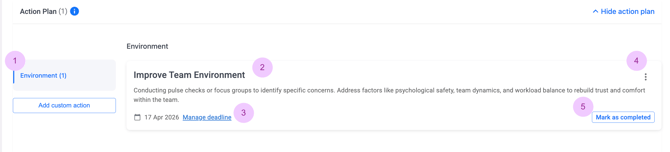
Each Action Plan appears as a card, making it easy to track progress at a glance. Every card includes:
-
Action title: a clear and concise description of the initiative
-
Description: details of what the action involves
-
Deadline: an optional due date to keep progress on track
-
From the action menu (three dots), you can edit or delete actions as priorities evolve.
-
Once an action is completed, simply mark it as Completed. The action will move to the Completed tab, creating a clear record of follow‑through and impact.
How Filters Affect Your Action Plans
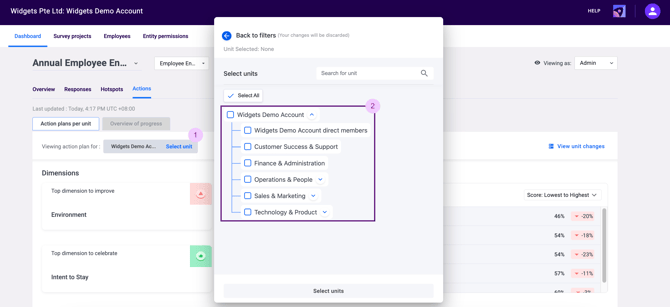
Action Plans in ACT are always linked to the filter context used when they are created, such as unit, survey, or period.
For example, if you create an Action Plan while viewing results for the Sales Department, that action will only appear when the Sales Department filter is selected.
This ensures that every action remains relevant to the data and team it was created for, helping leaders stay focused and avoid unnecessary clutter.
With Action Plans, ACT helps organisations close the feedback loop by turning employee feedback into clear, trackable actions that drive visible and measurable change.
If you’re an Entity Admin with access to the Permissions page, head to the final section of the next article to learn how to manage user roles and permissions in ACT so the right stakeholders have the right level of access.
If you have any questions or need further assistance, feel free to reach out to us at support@engagerocket.co We're here to help!